
Welcome Back!
What would you like to do?
Scene Selection


Connecting...
Scene Practice
Scan the QR code to connect a device
Please select a scene on your connected device.
Booking Time
Choose A Time For Your Session
July 2022
Patient
Session Time
Session Title
Session Notes
Patient Selection
Patient
My Bookings
My Patients
 Please Note:
Some patient names may show as Anonymous if you created their profile on a different device (e.g. laptop /
PC). All patient data is stored locally on your devices.
Please Note:
Some patient names may show as Anonymous if you created their profile on a different device (e.g. laptop /
PC). All patient data is stored locally on your devices.
Patient Detail
View patient details, upcoming bookings, and manage patient details.
CLIENT ID:
99vsTjsInd8HSGFIih98hjskl74
STATUS:
add the active green pill
TOTAL BOOKINGS:
Bookings PH
UPCOMING BOOKINGS
Bookings PH
Patient details
ⓘ Some patient names may show as Anonymous if you created their profile on a different device (e.g. laptop / PC). All patient data is stored locally on your devices.
Pre-treatment and Post-treatment Forms
Review any forms that still need to be completed.
2 forms left to complete
Outcome questionnaire and follow-up reflection are still pending.
Post-treatment Forms
Review any forms that still need to be completed.
2 forms left to complete
Outcome questionnaire and follow-up reflection are still pending.
Upcoming Bookings
Wed May 6, 12:50
In Person · Hospital - MRI Room
Fri May 15, 10:30
Remote · Anxiety Support
Mon May 25, 14:00
In Person · School - Fire Alarm
Discharge Patient
Discharging this patient will remove them from active treatment management on Boundless.
Readmit Patient
Readmiting this patient will move them back into active treatment management.
Booking Detail
Booking Summary
To update any booking information, click the relevant Edit button. Changes will apply once Saved.
Quick Actions
Cancel Booking
This action will cancel the booking.
User Detail
Title:
Title:
Title:
Title:
Title:
Title:
Title:
Organisation Detail
Monitor therapist usage, booking activity, and organisation performance.
Total Bookings
112 in person · 36 remote
Cancelled Bookings
12
8.1% cancellation rate
E-Learning Completed
Completion rate
Usage by Therapist
Overview of therapist activity and session hours.
XR Therapeutics
Most Used Scenes
XRT Dashboard
REVENUE PROGRESS
All Organisations
Scene QA
Scene Review Excel SheetScene QA
Please reference the following document:
Scene QA ProtocolScene Name
Is the scene name suitable? Does it match the XRT naming guidelines?
Pass Action Required FailScene Description
Is the scene description suitable?
Pass Action Required FailScene Video
Is the scene video suitable?
Pass Action Required FailScene Thumbnail
Is the scene thumbnail suitable?
Pass Action Required FailScene Quality
Scene Load Time
Functional Consistency
Pass Action Required FailControls
Pass Action Required FailVisuals
Pass Action Required FailAvatars
Pass Action Required FailSound
Pass Action Required FailUser Journey
Pass Action Required FailSafety
Pass Action Required FailReviewer Notes
JIRA Tickets
Uploading... Please do not navigate away from this page.
User Settings
Forms
Help & Support
XRT Courses
Develop your confidence and get the most from the Boundless platform through practical training and learning resources.
 REQUIRED
COMPLETED
REQUIRED
COMPLETED
Boundless in Clinical Practice
Learn how to safely and confidently integrate Boundless into clinical practice, from preparing clients to delivering effective sessions.
 REQUIRED
COMPLETED
REQUIRED
COMPLETED
Boundless for Coaching Practice
Learn how to integrate Boundless into coaching practice to support confidence building, meaningful practice and progress towards individual goals.
 REQUIRED
COMPLETED
REQUIRED
COMPLETED
Clinical Foundations of XR Therapy
Explore the research and clinical principles behind XR Therapy and how immersive environments can complement established therapeutic approaches.
Course Description
This comprehensive e-learning course is designed to empower therapists with the skills and knowledge to effectively integrate Extended Reality (XR) technology into their clinical practice. Through a blend of theoretical insights and hands-on training, participants will explore the latest advancements in XR therapy, understand its applications with various mental health conditions, and delve into the supporting research behind this innovative approach.
Therapists will gain practical experience using our cutting-edge software, learning how to enhance patient outcomes through the seamless incorporation of XR technology into their therapeutic toolkit. The course covers key therapeutic methods, such as Cognitive Behavioural Therapy (CBT) and graded exposure, and explains how these techniques can be applied in practice with the aid of XR.
By the end of this course, participants will feel confident in their ability to conduct treatment using our software and will be equipped with practical tools and strategies to optimise their therapeutic interventions.
Course Structure and Module Outline
Background:
This section explores the founding research behind XR Therapeutics and the potential of XR technology to improve treatment outcomes. Participants will also learn about the history of the company and the significance of its work.
Time: 20 minutes (up to an hour with additional reading materials)
Guiding Principles for Treatment:
Focusing on the foundational theories of Cognitive Behavioural Therapy (CBT) and graded exposure, this section delves into how these principles underpin XR-based treatment.
Time: 15 minutes (up to 1 hour with additional reading)
Preparing for Treatment:
An in-depth look at the theory behind XR treatment methodologies, exploring specific CBT tools and techniques that can be applied in sessions.
Time: 20 minutes
In Practice:
This module provides guidance on structuring therapy sessions with real patients, offering advice on the best practices for using the software during treatment. Supporting materials are available for download.
Time: 15 minutes
XR in Reality:
This section features clips from real treatment sessions, illustrating how the techniques covered throughout the course can be applied in practice.
Time: 20 minutes
How to Use Boundless:
Participants will learn how to navigate the software, with a video demonstration and step-by-step guide on booking and running sessions. A checklist and downloadable training manual are included.
Time: 20 minutes
XRT Accreditation:
A consolidation of knowledge through a short, 8-question assessment to reinforce key learning points.
Time: 10 minutes
Total Course Duration: 2 hours.
This course is ideal for therapists looking to expand their skill set with the latest XR technology and enhance their practice through cutting-edge, research-backed approaches.
1. Background
Let's start at the beginning, XR Therapeutics is a start-up company, spun out of Newcastle University and Cumbria Northumberland Tyne and Wear NHS Trust, which has been based on over 9 years of clinical and academic research.
The reason for the initial research was that traditional mental health solutions were not seen to be very accessible or effective for reducing anxiety in autistic people. So, our founders wanted to find a way that they could make it more accessible whilst improving patient outcomes. Throughout their work, they tested different technological interfaces and explored how using a visual aid to support Cognitive Behavioural Therapy (CBT) could increase the efficacy of the treatment. Within the studies, there were 40 autistic children and 10 autistic adults who went through the intervention for various situation-specific anxieties. The results demonstrated that by combining the immersive technology with clinically evaluated talking therapies they could take the overall success rate from >5% to around 50%.
If you would like to learn more about the research, download the additional resources at the end of this page.
Present day
Since the research, we have been working hard to build a mental health solution that doesn’t just support autistic people but supports a wide range of individuals with different types of anxiety disorders and other mental health conditions. Through working with different NHS Trusts, we have now proven this intervention works with the neurotypical population (adults and children) and it has also been adapted for people with learning disabilities.
The treatment, which you will be learning more about throughout this training module, combines traditional CBT with graded exposure and is delivered using immersive technology across a wide range of interfaces such as laptops, TV screens or projector systems. Graded exposure for almost every scenario can be done using these devices. The unique treatment can be adapted by the therapist in real time through a control panel on your screen. The treatment itself is designed to be customisable, it will enable you to tweak the surrounding environment in real time. Carefully graded challenges within individually tailored situations can be recreated within our therapeutic simulations and the client is allowed to control when they are ready to move on to the next step. These simulations can offer appropriate exposure for specific fears/phobias (i.e. those which can be presented visually). We will show you examples of this throughout the module.
For example, if you were working with a client who is struggling with social anxiety, you may want to start them in a scenario where they would expect to interact with people but not start them somewhere too crowded. With our technology, you could take them to an empty cafe but using your controls, you can slowly start to add more and more people in the scene or even make them interact with the client, as the intervention progresses you may want to try other environments such as a supermarket or a football stadium, gradually working through the client’s hierarchy and goals.
Administering traditional CBT to an individual can take anywhere between 7 to 20 sessions before the client observes a noticeable impact. Our treatment can shorten this to 2 sessions over a 2-week period, with some clients, making significant progress in as little as 1 hour.
Case study – Fear of Open Spaces:
"I knew the scene wasn't real, but I experienced all the emotions as if it was. I wasn't even aware of what a lot of my triggers were before coming into the immersive studio. In real life, I would have been far too overwhelmed, but this has allowed me to slow everything down enough to understand what scares me.’"Think of this intervention as an accelerator to traditional talking therapies, the visual element and immersive nature of the treatment allows for clients to safely explore and understand their anxiety triggers, whilst being more realistic than looking at a set of pictures or a video. Here’s what some of our clients have to say:
Randomised-Controlled-Trial-of-VR-Treatment-with-CBT-in-Young-People.pdf
Reducing-Fear-in-Young-People-ASD-through-VREs.pdf
Using-VREs-with-Autistic-Adults.pdf
2. Guiding Principles for treatment
You may already be very aware of the basic principles of CBT and graded exposure, however, we want to reiterate the importance of these fundamentals and we hope you will keep them at the forefront of your mind whilst going through the intervention. This will be crucial to successful client outcomes. For some therapists, this may be a new concept of delivering CBT techniques, as not part of their usual therapeutic tool kit. Others may require a revisit to some of the techniques to allow them to feel they have what is required for working with the therapeutic simulations. Therapists who are creative are also encouraged to use these skills in the immersive environment with clients. For example, if working with a child who has an attachment figure (teddy bear), this can be a powerful force for supporting the child and allowing the treatment to progress.
Cognitive Behavioural Therapy:
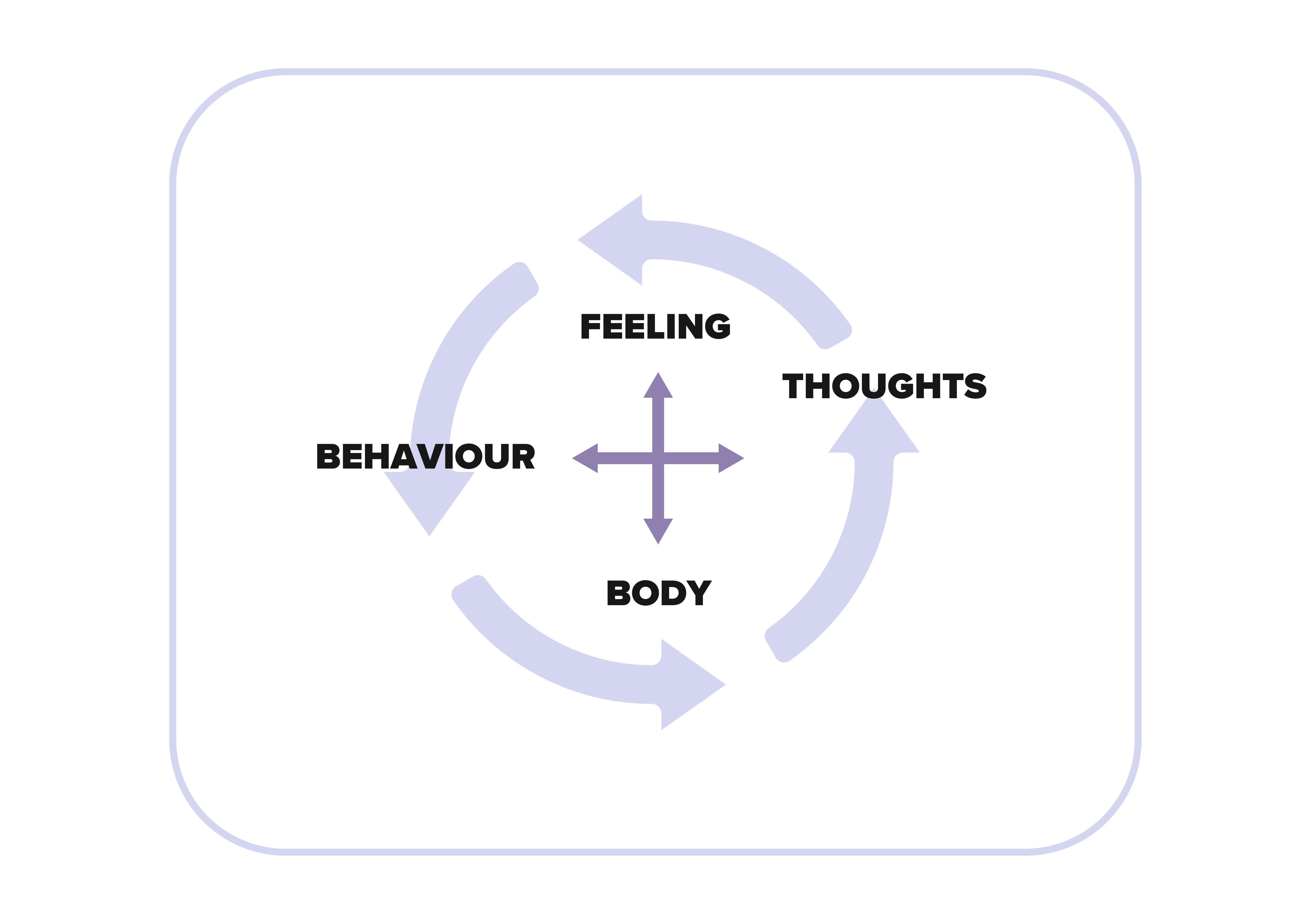
Cognitive behavioural therapy (CBT) is a talking therapy that can help clients manage their problems by changing the way they think and/or behave. The focus of CBT is problem-oriented, with an emphasis on the present. Unlike some of the other talking treatments, it focuses on 'here and now' problems and difficulties, instead of focusing on the causes of distress or symptoms in the past, it looks for ways to improve a client's current state of mind. Although gathering relevant triggers from the past or schemas, can also be helpful in treatment via a case formulation.
It's based on the concept that your thoughts, feelings, physical sensations, actions or behaviours are interconnected, and that negative thoughts and feelings can trap you in a negative cycle. CBT aims to help the client deal with overwhelming problems in a more positive way by breaking them down into smaller parts or steps.
The key basic principles for successful treatment are:
- Normalising anxiety with the client
- Practising and encouraging the client to use relaxation techniques
- Using the hot-cross bun model to support treatment
- Using the anxiety scale to monitor the client's anxiety
Graded Exposure:
Graded exposure is a therapeutic technique used primarily in cognitive-behavioural therapy (CBT) to help individuals confront and gradually overcome their fears or anxiety. It involves systematically exposing the individual to feared situations, objects, or thoughts in a gradual and controlled manner. Through using our immersive technology, you can expose the client to their anxieties in a very safe and controlled manner.
The process of graded exposure typically involves:
- Creating a Hierarchy
- Starting with Low-Level Exposures
- Gradually Increasing Exposure
- Repeating Exposures
Traditional graded exposure has become more difficult to do within healthcare settings and for the client it can sometimes seem daunting or unrealistic. For the therapist, it can be time-consuming, expensive and inconvenient and it can be hard to motivate the patient to engage in treatment as often it can seem overwhelming. This is why we hope using our technology will help you as a therapist to alleviate these pain points.
By providing an accessible solution that may not feel as daunting, clients can become more engaged in the treatment which often leads to better results. In fact, since treating people, our patient outcomes have shown that out of those treated, 95% have experienced a noticeable improvement in their symptoms and 73% have made a full recovery.
The digital scenes can be used to support the following:
- Generalised Anxiety Disorder
- Phobias
- OCD
- Panic disorder
- Agoraphobia
- Health anxiety
- Behavioural activation
- Trauma and/or PTSD
Have a look at some of our scenes to get a better idea of just some of the areas we can treat:
Immersive Technology Therapist Training Manual_Jan2025.pdf
3. Preparing for treatment
Before starting treatment, you will need to work through some exercises with your client, these may already be familiar to you. We work with a huge range of healthcare professionals with varying levels of abilities, we mainly train individuals who have experience of giving CBT in their clinical practice but we have also worked with specialist nurses and support workers.
Ahead of treatment:
It’s important that ahead of treatment you have an understanding of the following information before planning treatment, this can all be discussed within the pre-treatment session. You will need to discuss any information already obtained from the family/supporter from your first contact with the client, including:
- Age and verbal fluency of the participant.
- Level of anxiety/impact on functioning.
- Situations which make the person anxious.
- If possible, an idea of what situation/s the participant is particularly anxious about should be explored at this stage, and therefore what their ‘target situation’ might be.
- Effect on individual/family life.
- What, if anything, has the participant done already to deal with their anxiety/coping strategies and any other therapy they have tried for anxiety?
- How the participant describes anxiety in their own words (e.g. worried, scared).
- Some basic information about how anxiety is experienced (e.g. physical – heart-beating etc., worrying thoughts) if they are able to express this. Often participants find it difficult to recognise the physical sensations of anxiety.
Pre-treatment exercises:
The Hot Cross Bun model:
The "hot cross bun" model is a cognitive-behavioural therapy (CBT) tool used to explore the relationships between thoughts, emotions, physical sensations, and behaviours. This method is particularly useful in identifying and challenging negative thought patterns that contribute to emotional distress. This technique should be used throughout treatment. Here’s a blank example:
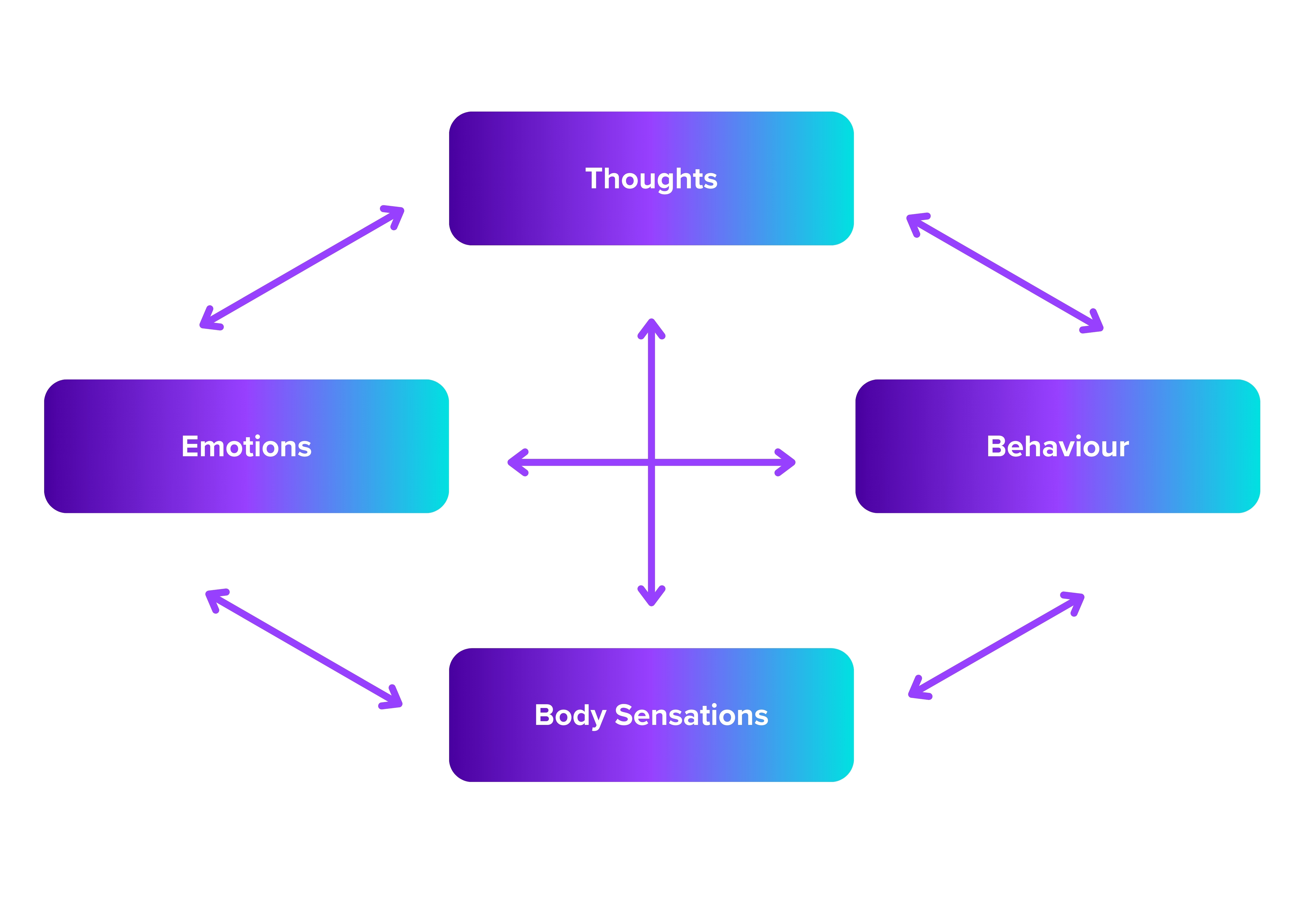
In practice, ahead of treatment, you will spend time exploring situations which make the client anxious. The hot cross bun of anxiety can help with understanding how to reduce anxiety in specific situations - if you can change one or two elements then anxiety may be reduced. The client should be encouraged to explore what thoughts go through their mind when they are in an anxious situation. From that, the therapist and the client will be able to develop rationalising thoughts/mantras, e.g., ‘I will be ok’.
It is important not to describe any anxious thoughts as 'bad' thoughts as this can be taken literally. It can also lead the client to believe they have bad thinking. By introducing physical relaxation techniques (these can be downloaded here), it will help the client to utilise them in sessions, it is also important to encourage practising these between sessions. The therapist can also practice them with the client during sessions which will help when viewing an anxiety provoking scene.
Here's how the client would need to complete it:
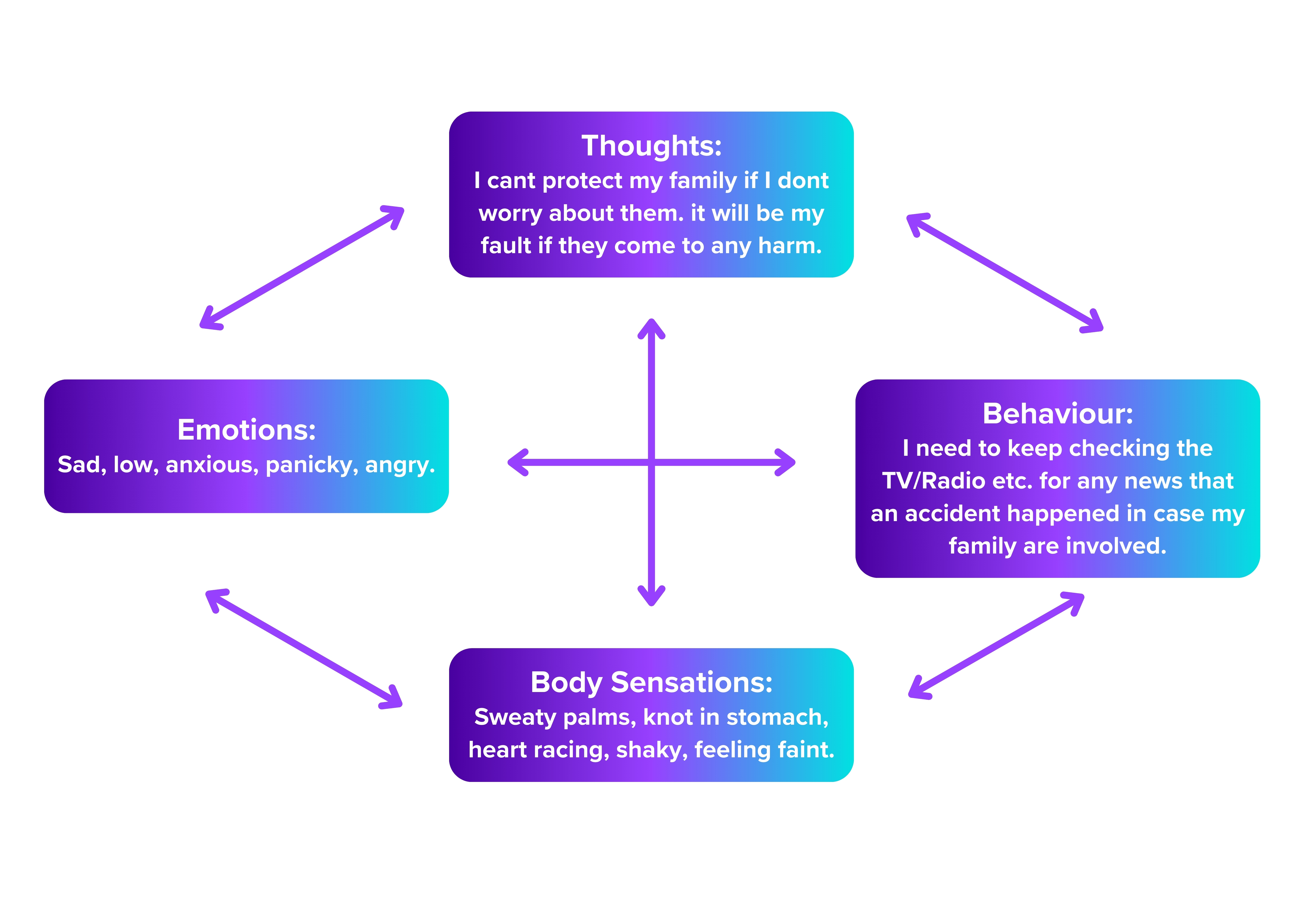
Complete each section (each box on the model).
'Thoughts' - At the top of this model, any negative thoughts or beliefs about your issue or anxiety, e.g., "Harm will come to my family if I can’t protect them" (this would be for Generalised Anxiety-worry etc)?
'Behaviour' - "I keep checking the TV, Radio (news) or try to ring family to make sure they are safe" (worry).
'Body Sensations' - "I get sweaty, heart races, knot in stomach" (this means anything that happens physiologically in the situation connected to your worry).
'Emotions'- "I get sad, upset, anxious, panicky-angry"?
Goal setting:
Goal setting is an integral component of cognitive-behavioural therapy (CBT) for several reasons:
- Sets expectations: Setting specific, achievable goals provides clarity and direction for therapy. It helps both the therapist and the client to understand what they are working towards and what changes they want to make in their lives.
- Motivation: Having clear goals can enhance motivation and engagement in therapy. When clients have a clear vision of what they want to achieve, they are more likely to actively participate in therapeutic activities and homework assignments aimed at reaching those goals.
- Measuring Progress: Goals serve as benchmarks for measuring progress throughout the therapy process.
- Identifying Priorities: Goal setting helps clients prioritise which areas they want to focus on during therapy. It allows them to identify the most pressing issues or concerns and work on them systematically.
- Empowerment: Setting and achieving goals in therapy can empower clients by demonstrating their ability to take control of their thoughts, emotions, and behaviours.
- Flexibility and Adaptability: Goals in CBT can be adjusted and revised as needed based on the client's progress, changing circumstances, or new insights gained during therapy. This flexibility allows therapy to evolve in response to the client's evolving needs and goals. Setting out goals specifically using ‘SMART’ are as follows:
SMART Goals
SPECIFIC - Be very clear in what you want to achieve. Consider breaking the goal down into smaller steps.
MEASURABLE - How will you know when you have achieved your goal? What will you be doing at that time? What will others notice you doing? What will be different? What will you have started or be doing regularly? What will you have stopped or be doing less of?
ACHIEVABLE - Ensure your goals are not too high. Don’t set yourself up to fail! Consider setting smaller goals on your way to the big one. Celebrate your successes. If you don’t achieve what you set out to, then ask what you could do differently, what would make it more likely to succeed next time?
REALISTIC & RESOURCED - Is this achievable with the resources I have? Are there any other resources you need before you can, or to help you, achieve your goal? How can you access these resources? What problems might you have? What can you do to minimise those problems?
TIME-LIMITED - Set a reasonable time limit to achieve your goal. 1 week, 1 month, 6 months, 1 year, 5 years? Consider different (smaller) time limits for smaller steps.
Goal 1:
Goal 2:
Goal 3:
Goal setting plays a crucial role in providing structure, motivation, and direction to treatment. By collaboratively setting and working towards specific goals, clients and/or their supporters can make meaningful changes in their lives and achieve improved mental health and well-being. Working with the client’s hierarchy and understanding their goals for treatment are important steps for selecting the scenes you will be using for treatment. It will help you to understand where the client is at and what they would like to get out of their treatment plan.
When setting goals with the client it's important to remember the following:
- It's important to set goals with the patient and/or their supporters as their desired outcomes need to be realistic.
- Equally, it's also good to set expectations of the treatment.
- Ensure that throughout this process, there is a lot of positive reinforcement!
Hierarchy of feared situations:
A hierarchy refers to a structured list of situations that trigger anxiety or fear for a particular individual. It's often used in the context of CBT for treating anxiety disorders, phobias, and other related conditions.
Creating a hierarchy involves collaboratively working with the client to identify and rank anxiety-provoking situations from least to most anxiety-inducing. The purpose of the hierarchy is to gradually expose the individual to feared situations in a systematic and controlled manner, allowing them to confront and overcome their fears.
Here's how the process of creating a hierarchy typically works:
- Identify Anxiety-Provoking Situations
- Rank the Situations
- Create the Hierarchy
- Exposure and Desensitisation
- Practice and Reassessment:
A hierarchy allows us to be specific and to gauge severity for each difficulty.
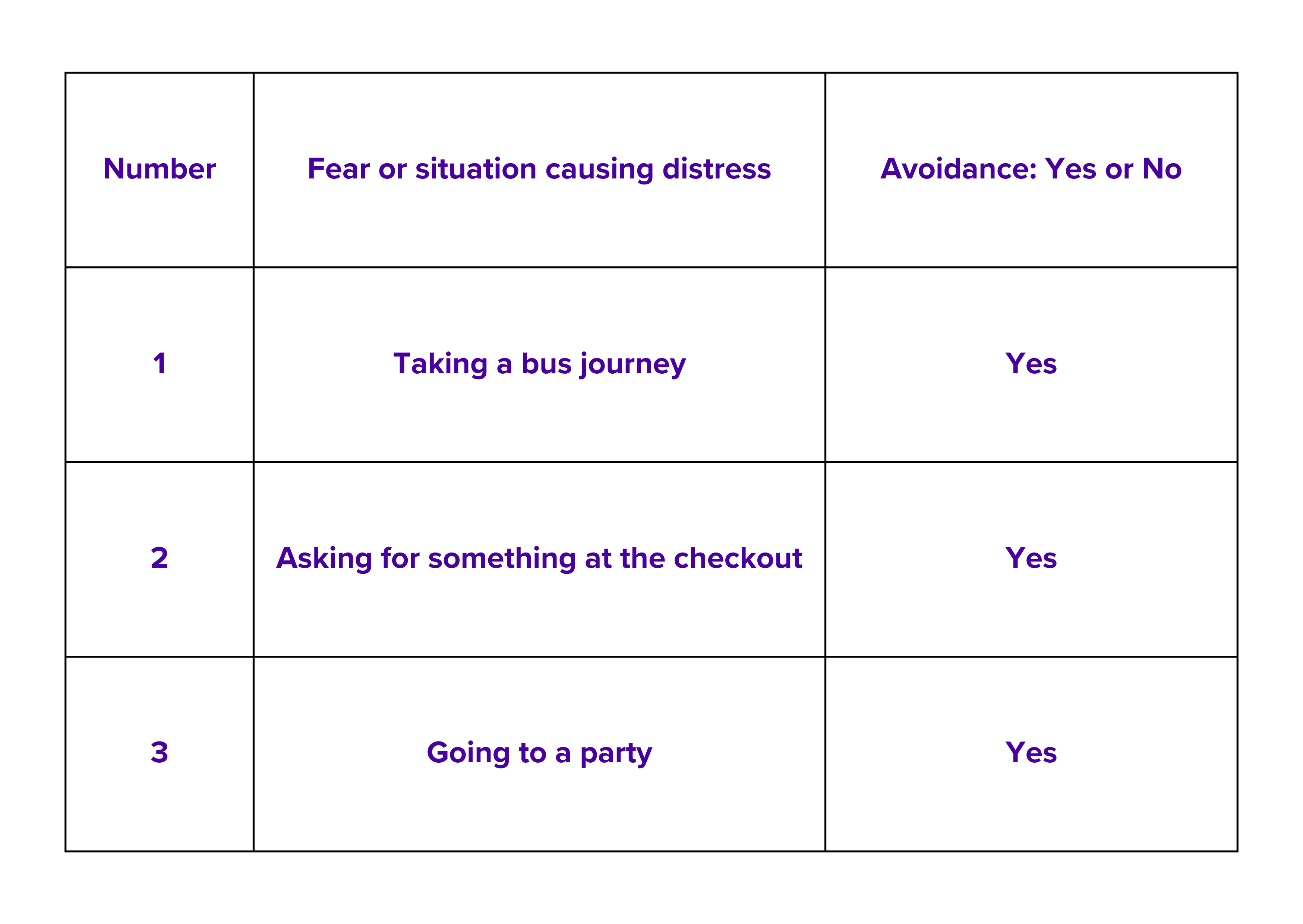
Here’s an example of a blank hierarchy:
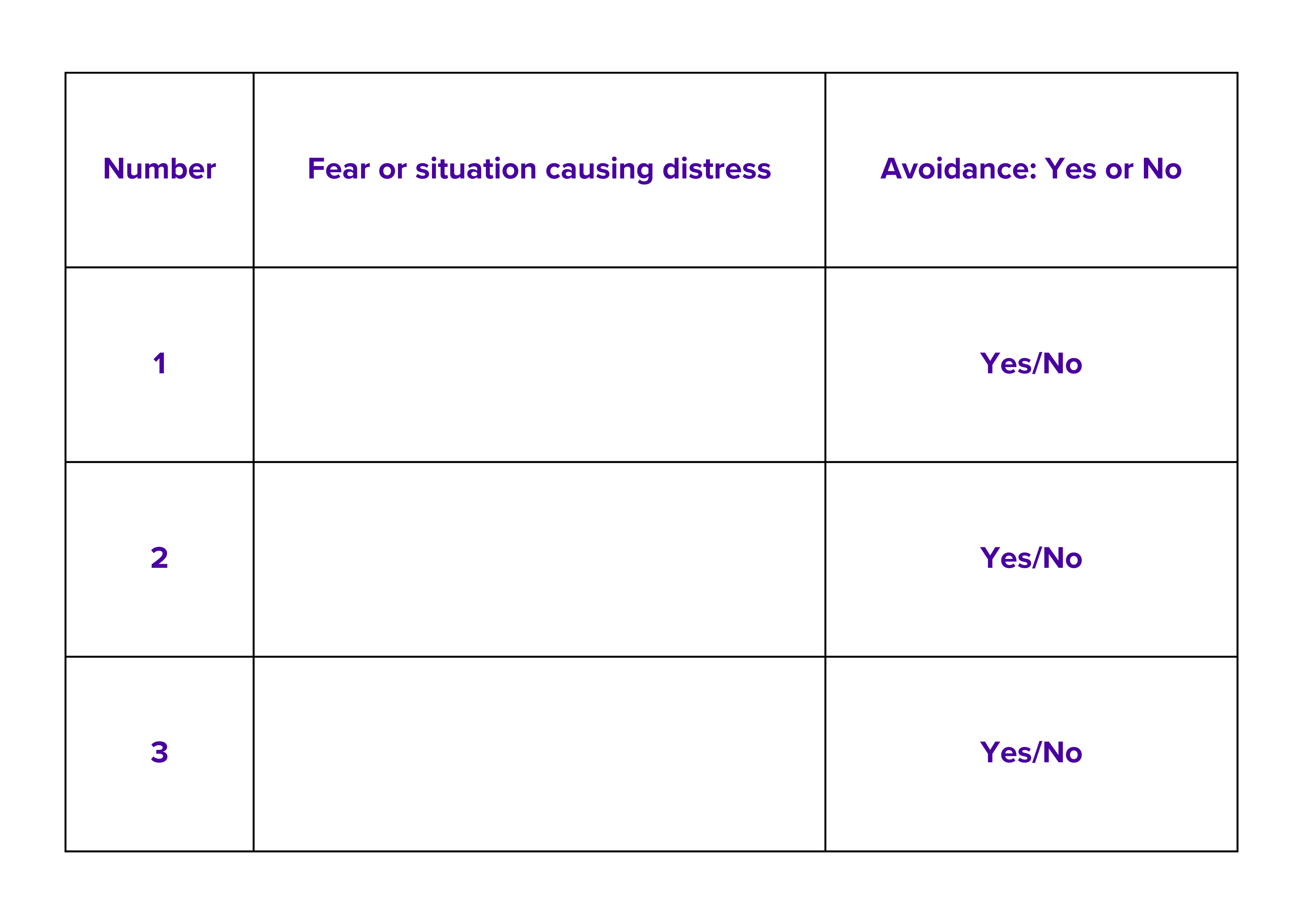
And, here’s an example of how this would look once it has been completed by the client:
Anxiety Scale
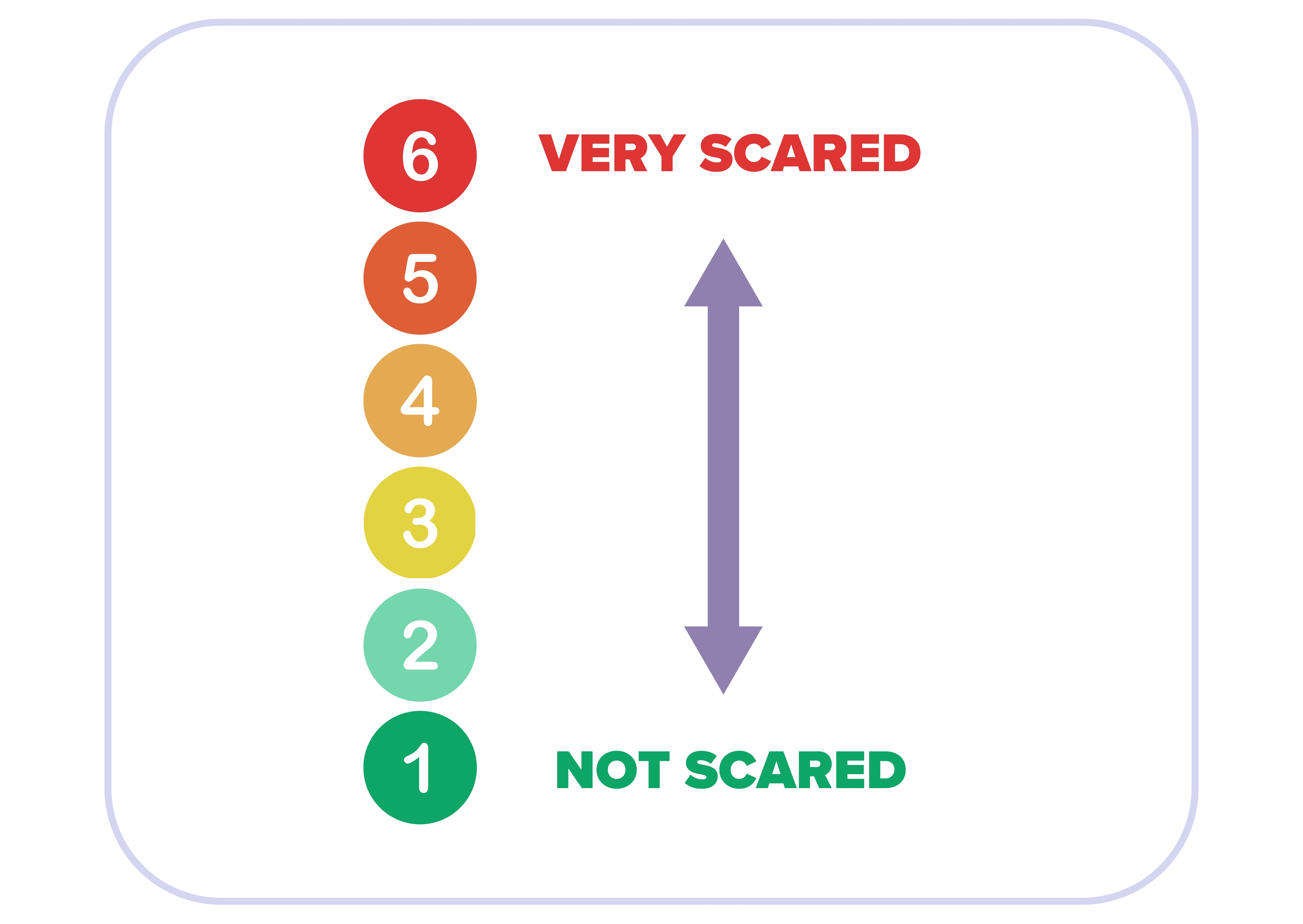
Within treatment, it is useful to use an anxiety scale, typically when conducting treatment we recommend using a 6-point scale like the one above. Using this is a great way to quickly check in with the patient throughout the treatment sessions.
The ‘VR-E, Fidelity’ rating scale can also be utilised for VR clinical rating which can be downloaded at the end of this section, the fidelity rating scale is a good aid ahead of conducting treatment for clinicians to evaluate themselves and/or colleagues.
All of the other techniques and exercises we have spoken about within this section can be downloaded in lesson 4 (In Practice) this will include a blank hierarchy form, a blank goal setting form, the Hot Cross Bun model and other useful materials.
Training requirements and flexibility
In the Preparing for Treatment section of this course, you will be provided with a clinical rating scale, similar to; ‘‘Revised Cognitive Therapy Scale’ or ‘CTS-R’, by Blackburn, I.-M. et al. (2001) & ‘Cognitive Therapy Scale Revised’ (CTSR-4), Preliminary Psychometric Evaluation, by Alfonsson, S., Karvelas, G., Linde, J. et al, (2022)’. Although we recommend the use of to facilitate engagement and positive outcomes, this can be adapted for the needs of the client accessing the platform.
We want to take this opportunity to emphasise that the manual and this training course is a ‘GUIDE ONLY’ and is to be used at your discretion, once XR Therapy has been implemented into your service. ‘CLINICAL JUDGEMENT’ will always be considered when treating a patient and XRT is aware this can at times aid in treatment. Although at the same time, keeping a framework of the treatment you are offering will further aid in the recovery process.
4. In practice
Ahead of the session, you will need to send out blank forms and exercises that were previously discussed, these can be downloaded using the downloadable materials at the bottom of this page. This will include their goals, hierarchy and the Hot Cross Bun Model. Also, alongside this there will need to be joining instructions and a brief overview of how they can access their treatment. Once the client has been assessed and deemed suitable they will follow the following pathway:
Pre-treatment
The therapist is to teach the CBT techniques from the training to the client and/or their supporters and agree on the target situation to work on. This should take approximately 45 minutes and can be done over the phone or video conference.
Session 1
This occurs about 2 weeks after the pre-treatment exercises/session has been completed. Session 1 will be focused on the relaxation scene and starting on very low difficulty, within Session 2 you will be gradually increasing the difficulty. Sessions using the digital scenes can last up to an hour depending on the standard clinical procedures of your service. For those with more mild to moderate conditions, the session time may be closer to 30-40 minutes, for those with more moderate to severe conditions, the sessions may be closer to 50-60 minutes. It is important to ensure the client is aware that they can take breaks throughout the session as and when needed. it is also worth encouraging the client and their supporters to practise what they have learnt within this session ahead of session 2.
Session 2
This should occur within one week of their first session and the same procedures apply. It will end with the next steps given to parents/supporters and the client. By the end of session 2, the patient should have reached one of their goals that was outlined before treatment. Some clients need additional sessions to work through their goals and hierarchy, this is up to your discretion as a therapist. We advise to only offer additional sessions if you believe the client would benefit and make further progress.
Follow-up
We advise therapists to check in with their client approximately 6 weeks after their final session to complete post treatment outcome measures and psychometric questionnaires, this could be via a call or meeting. We advise that any information regarding the client that may be shared with XRT is to remain anonymous to ensure that we are not able to identify the client.
Things to consider when conducting the treatment:
- Try to not leave any longer than a two-week gap (preferably weekly) between sessions. This is due to the potential for client relapse, dropping out of treatment or not engaging in the process.
- Try to give a rationale as to why more sessions are needed above XRT recommended sessions.
- Although three sessions are recommended for step 3 patients. *However, due to any complexity entering step 3, this may go over and needs to be negotiated by the treating therapist or clinical supervisor.
- When selecting scenes, we would recommend utilising no more than 1 to 2 scenes per session. This is to avoid overloading the client and ensure they have enough time to work through their anxiety provoking situations.
Hot-cross-bun-model-five-areas.docx
Hierarchy-of-feared-situations.docx
Goals-form-adapted.docx
5. XR in Reality
Here's an example of a real patient going through the intervention with our lead therapist Andy:
This part of the treatment demonstrates a recap on ‘out of session homework’. Client described situations around unwell people and how she was able to manage this. Also going on public transport where people may be unwell and how this was managed. Further learning and cognitive restructuring around situations and how she would deal with them differently (with ratings gained at the time of exposure). They also described using strategies in session to help in the situation when out.
This clip demonstrates use of the relaxation exercises in treatment. Prior to looking at specific anxiety provoking scenes from the agreed hierarchy. The use of ‘Functionality’ by the Therapist to further expose the client to the stimulus, i.e. vomit scene and sounds. Ratings checked to gauge management of exposure on the 6-point scale.
This clip shows the flight scene. The Therapist encourages ‘Real Time Exposure’ blended with ‘Imaginal Exposure’, i.e., seeing the scene and putting Therapist/Client alongside aisle on the flight scene. Ratings taken to again, gauge response to functionality changes from the Therapist-‘Turbulence’. Therapist checks out any negative thoughts for the client, with elaboration from the client how others may be feeling/thinking, related to self. This allows further considerations for beliefs to change/adapt.
The clip here demonstrates exploration of past coping for the anxiety provoking situation. With how this has now changed moving to a more positive state of learning. Describing more ways of managing this by the client.
Here the clip shows changes to ratings on the stimulus viewed in the session. Client’s feedback incorporated on what was gained in the immersive environment.
The clip here is guiding the client through the relaxation techniques, with ratings taken for the end of the treatment session.
Here we see a recap of the flight scene, the Therapist is using further strategies of engagement to the stimulus, with ratings taken of witnessing an unwell person on the flight-around normal reactions.
With regards to the technology, here's some examples of how you would visually use a hierarchy to plan the layout of the sessions using the therapeutic simulations:
Patient A has come to you as they are struggling with social anxiety, ideally they would like to be able to go to their local supermarket and not feel anxious about it. This could be broken into 3-4 steps for example:
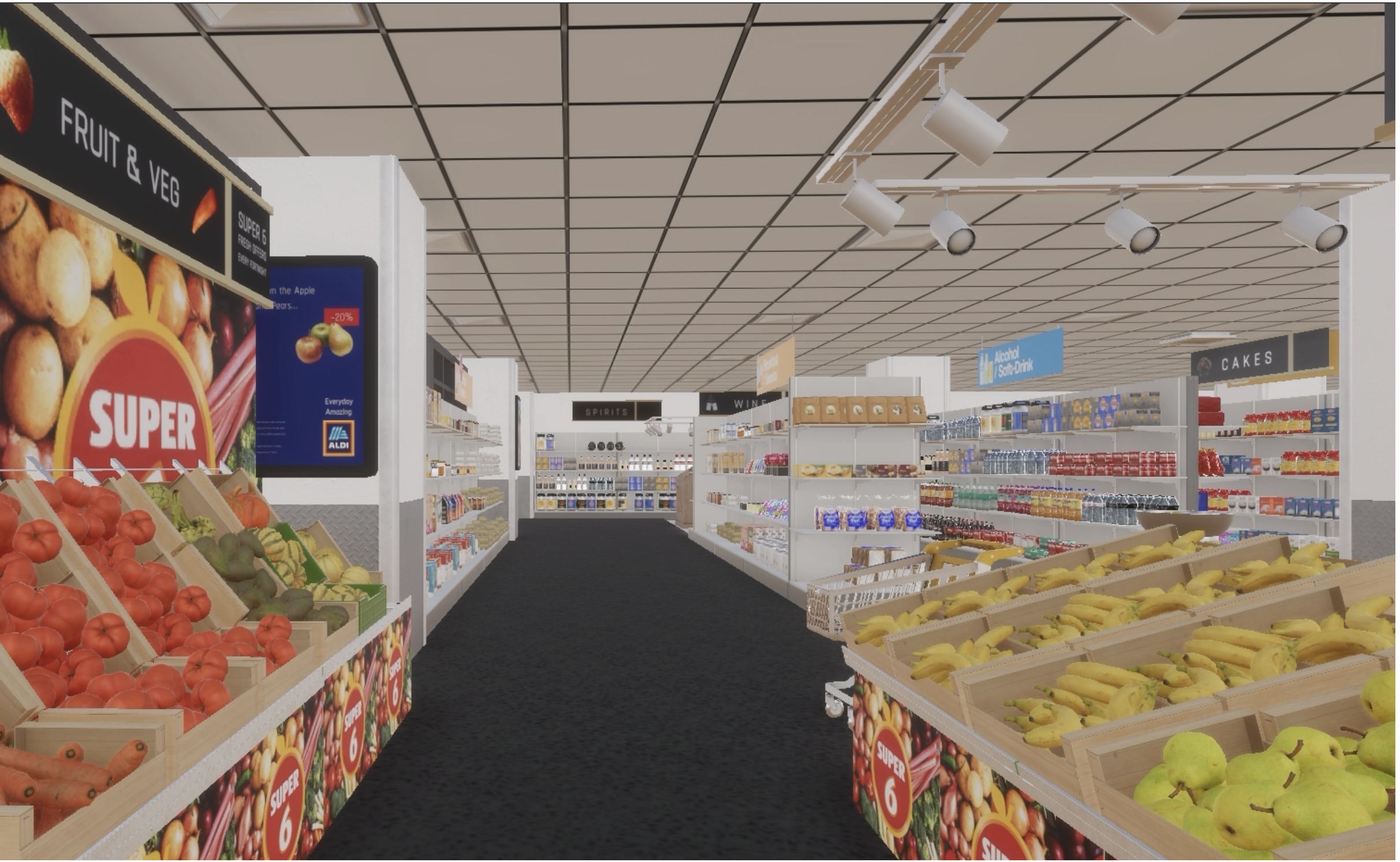
1- Going to a quiet supermarket with no one there.
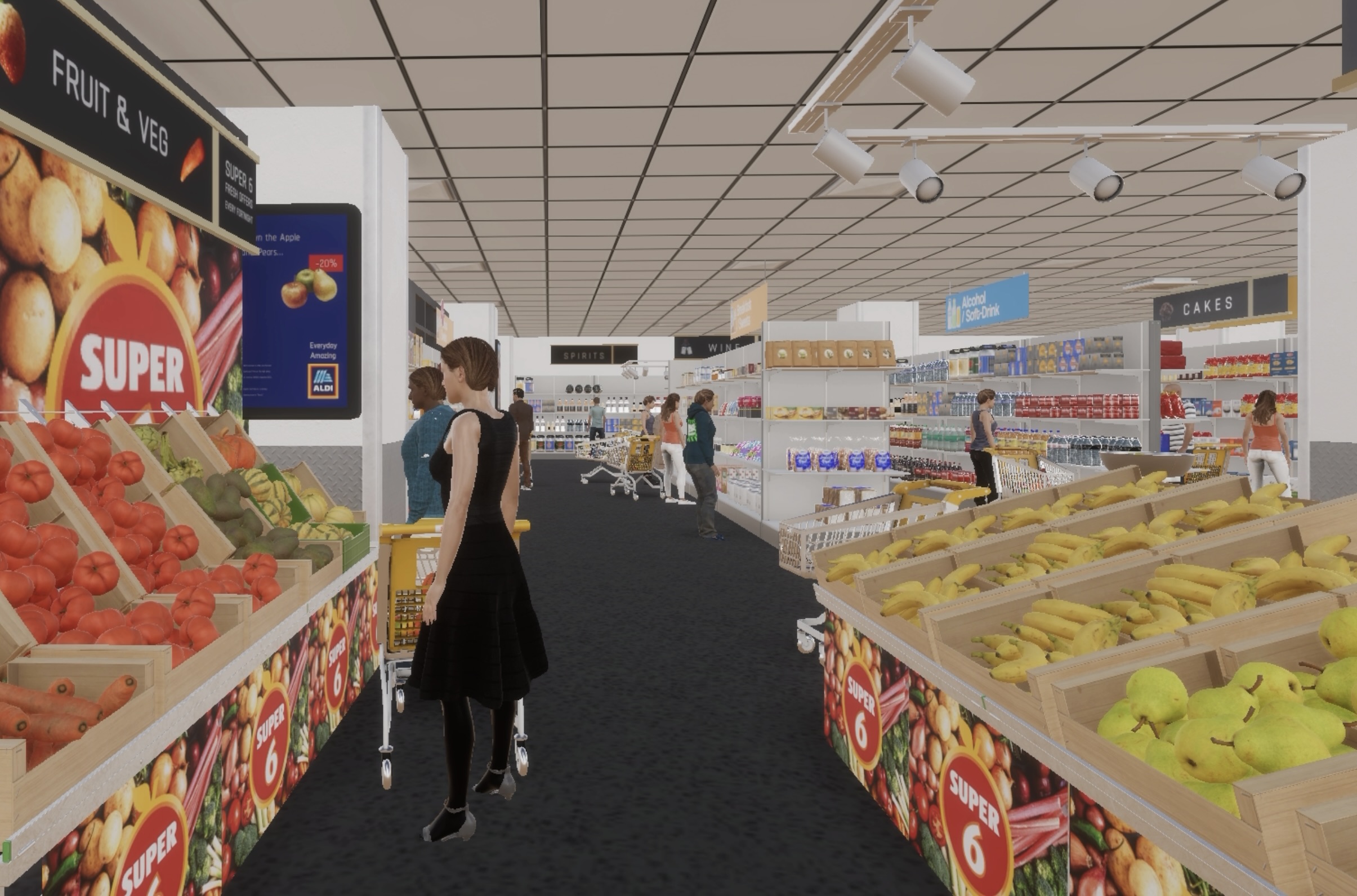
2 - Going to a busier supermarket with more people there.
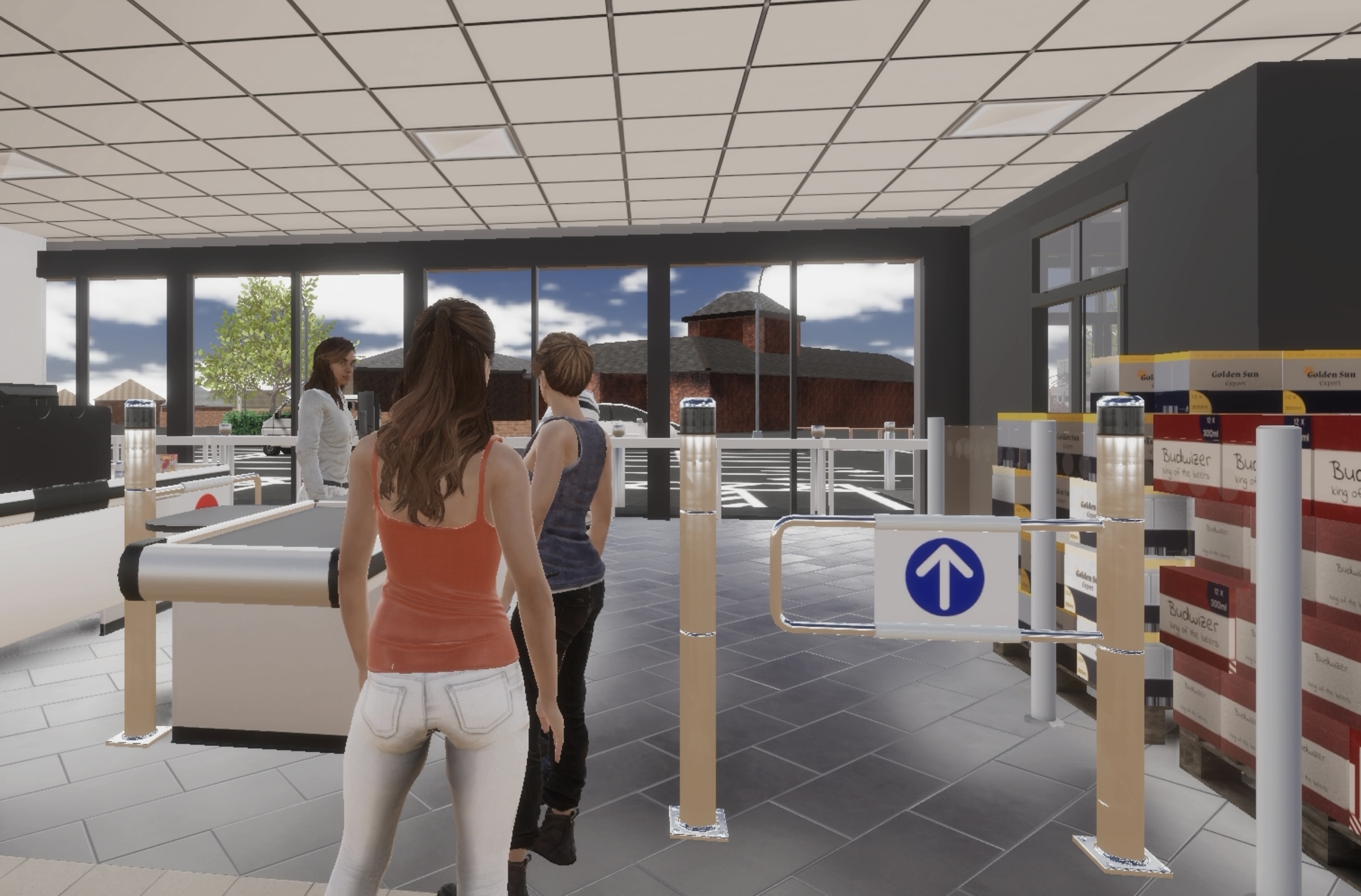
3 - Waiting in line and speaking with the cashier
Patient B has come to you because they've been really struggling with their phobia of dogs. This is restricting their life as they would like to go outdoors more, in particular their local park. Breaking this into 3 steps could look like the following:
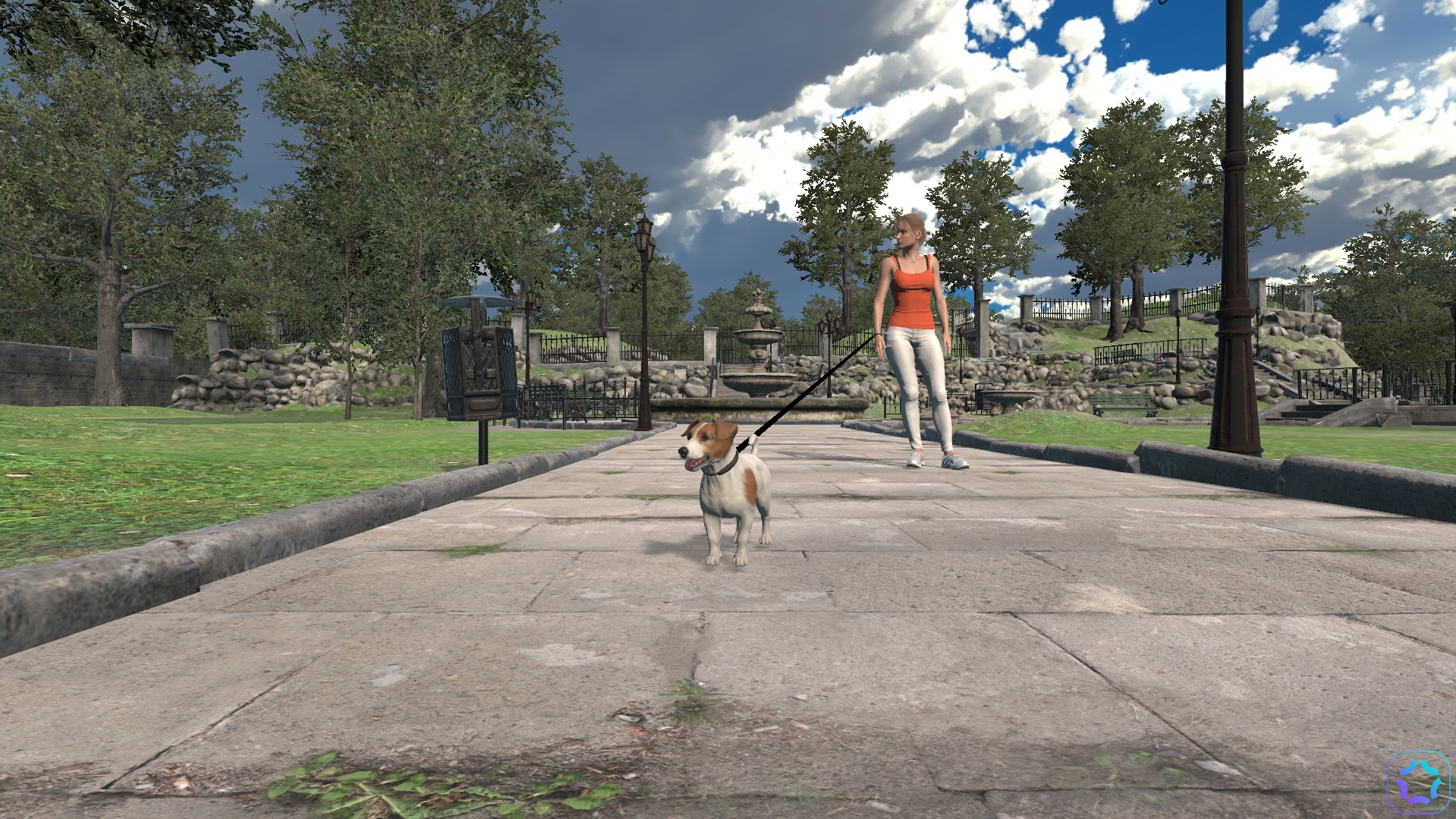
1 - Small dog on a lead.
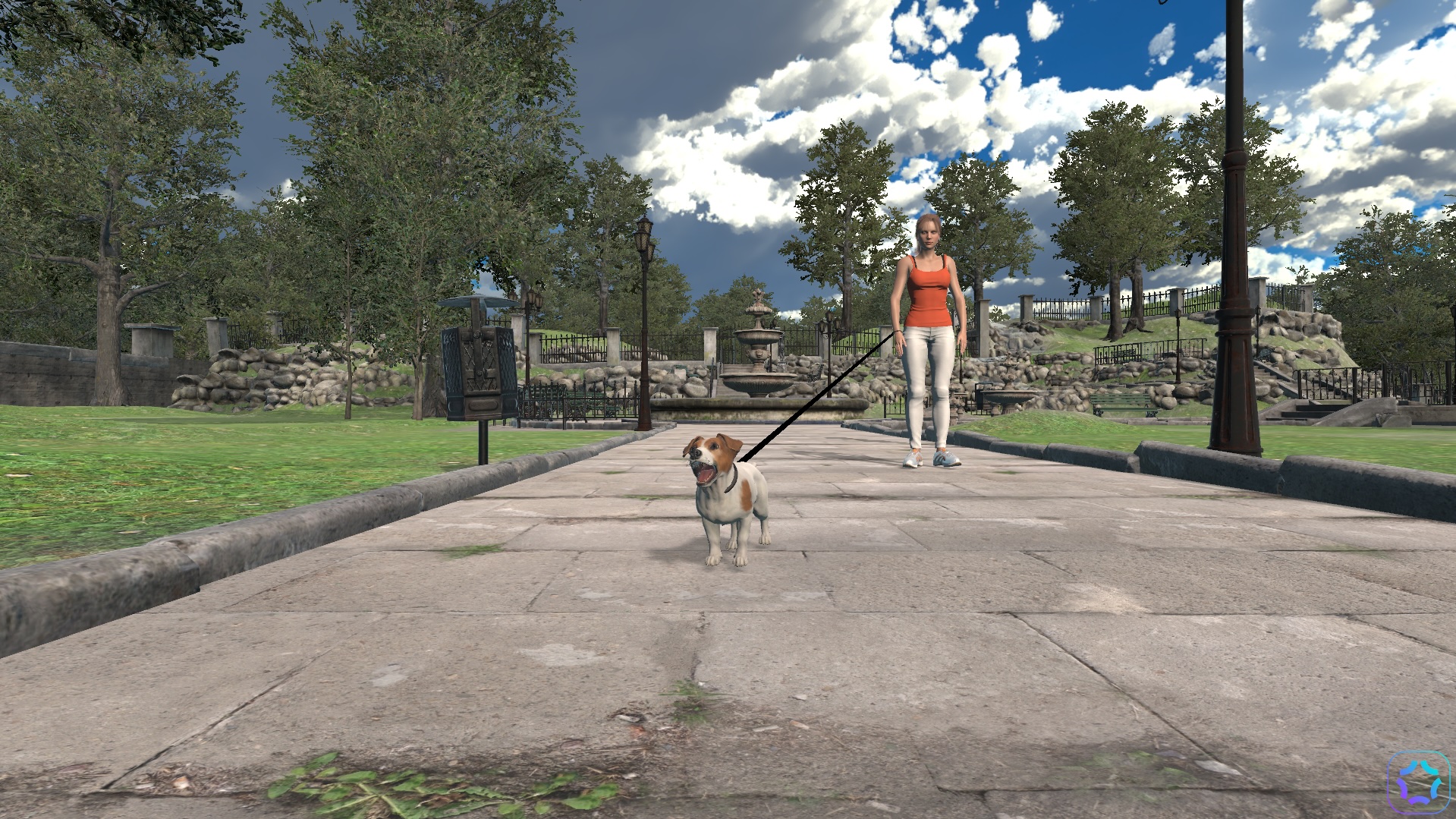
2 - Small dog barking on a lead.
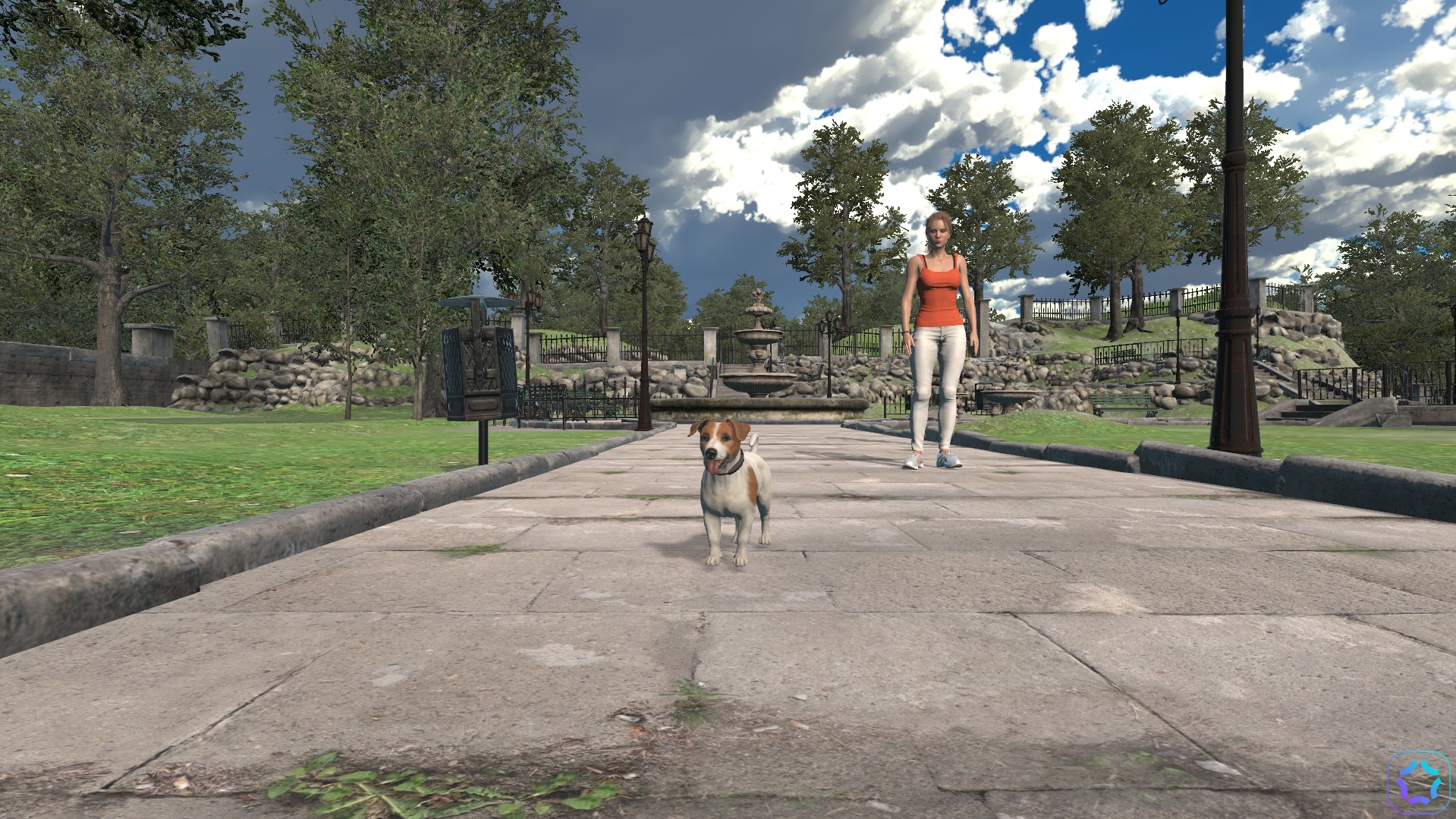
3 - Small dog off the lead.
6. How To Use Boundless
Getting Started
You will receive an email to set up your Boundless account. This will contain a link for you to set your password.
When you have created your password, you will be able to see your Homepage.
We recommend you save the Boundless Homepage as a favourite or shortcut in your Bookmark bar for quick access.
From your Homepage you will see three options:
1. Book a Boundless session
2. View Scene Gallery
3. Go To eLearning
Viewing the Scene Gallery
From your home page, click View Scene Gallery where you will be able to see all the scenes in your library.
To see more information about a scene, click on the image you would like to view. You will then be able to view the scene and explore the controls and functionality within the scene to prepare for your session.
Moving your mouse to the bottom of the screen will enable you to view and use your controls. Click Fullscreen to make it larger and click ESC to exit this mode. To return to the Scene Gallery, press Back.
Controlling scenes using an external device
You may want to connect to a tablet or your mobile phone to use these external devices for the controls for your session.
It's very easy to do this, open the Scene Gallery and scan the QR code with the tablet or mobile phone you wish to use to control the scene. The Scene Gallery and controls will now be shown on your tablet or mobile phone. You’re ready to go!
"Please note: you can only connect to an external device to control scenes by selecting Scene Gallery and scanning the XR code. You can't do this through Manage Bookings. This is because the external device connection is for in-person sessions connecting to a TV screen."
Booking a Boundless session
Select Book a Boundless Session from the Home page where you will be able to see all the Scenes in your library – you can use the filters at the top of the screen to select All or choose to look at Treatment or Relaxation scenes only.
You can select up to two scenes to use in your session. If preferred, you can continue with one selected scene. Click on the image to select a scene – if you change your mind, you can deselect a scene by clicking on the X. When you have chosen, click on continue.
You can now select the date and time of your Boundless session. You have the option to rename this session from the default title ‘1hr Boundless Session’. Only you will be able to see this session title change and any session notes you make.
Confirm booking > Success! You have now booked your first Boundless session.
You can now return to the Home page to book another session or view this booking in My Bookings.
How to Manage a Booking
In the My Bookings section you will see 3 options:
1. Upcoming Bookings
2. Past Bookings
3. Cancelled Bookings
In Upcoming Bookings, you can click on a Booking to:
· Edit your session title (this information will be private to you)
· Edit your session notes (this information will be private to you)
· Find your session link – you will need this link to join the treatment session. You will need to copy this link and paste into your browser to join the session. You will also need to copy this link and send it to your patient (using your normal appointment booking process) so that they are also able to join the session at the scheduled date and time.
· Reschedule a session – this will allow you to select a new date and time. Remember to send a new session link to your patient for the rescheduled date and time.
· Edit your scene selection - you will be taken back to the scene gallery where you can pick up to two scenes but can continue with one.
· Cancel a session - this will appear in your cancelled bookings.
In Past Bookings, you will be able to review all previous sessions.
In Cancelled Bookings, you will be able to review all cancelled sessions.
Joining a Session as a Therapist
You can find your session link in My Bookings for the date / time you have arranged.
Use the link and then you will be in your session. You will see your patient and yourself on the screen (like a Zoom call) with the controls to start the session.
Scene Controls
· Start / Stop Stream – to open or close the digital scenes for you and your patient to view
· Fullscreen Toggle – expand the digital scene to fit your whole screen
· Scene 1 – you can select the first scene you chose
· Scene 2 – you can select the second scene you chose
· Relaxation – this will open a relaxation scene
· Restart Current Scene – you can restart if the connection was lost for any reason
IMPORTANT!
1. You can see the controls for each scene to navigate through the scene, but your patient cannot.
2. As you move through the scene new controls and functions will become available to use in the appropriate part of the patient's journey as you both navigate the scenario. For example: if entering a hospital for a blood test, you would be able to pick up the needle when you are in the clinic room and not in the waiting room which would be too early and inappropriate in the scene journey.
Joining a Session as a Patient
Make sure your Patient has received their session link from the therapist prior to the day of the session via email or the normal appointment booking process. You can find the session link in My Bookings and clicking into the booking.
On the day/time of the session, your patient would copy or click the link provided and be taken to the XRT session (like joining a Zoom call).
They will need access to their Microphone and Video for the call
How to deliver a session using a TV screen
You may wish to connect your laptop or desktop PC to a larger screen to deliver your Boundless session. If you chose to hold the Boundless session on a larger screen connected via a HDMI cable, you have the ability to control the scenes using another device such as a tablet or a smartphone.
This means you can step away from your laptop or PC for the session and your patient cannot see the controls during the session.
This is straightforward to do!
1. In the room where you would like to connect to a TV screen, connect the HDMI cable from your laptop or PC to the TV and check the input for whether this HDMI 1 or HDMI 2.
2. Turn on the TV and using the remote control ‘Source/Input’ button change the TV input to the required HDMI setting (HDMI 1 or HDMI 2) if the TV screen does not automatically show your laptop/pc screen
3. On your laptop or PC, open your Boundless Homepage and go to the Scene Gallery and scan the QR code with the tablet or smartphone you wish to use to control the scene.
4. The Scene Gallery and controls will now be shown on your tablet or smartphone (we term this the ‘external device’).
5. You can now select one scene on your external device.
6. You are now ready to start your session and control the scenes using your external device.
How To Guides for using Boundless can be downloaded from the bottom of this page.
Boundless Guide (Therapist).pdf
XRT Certification
This quiz will be the final step to becoming accredited to use XRT's treatment, the quiz will include questions relating to what you have learnt within this course and will be a good way to consolidate your knowledge ahead of treatment.
Once you have completed this, you will be able to access our Boundless platform.
Good luck!
What type of devices can be utilised by a therapist for XRT treatment?
Excluding the pre-treatment session, what is the number of XR treatment sessions we recommend?
Which of these conditions could you use XR therapy for?
When creating goals it's best to use SMART goals, what does the A stand for?
When treating social anxiety, how would you match the following parts of a digital scene with a patients hierarchy?
The first scene you'd show:
The second scene you'd show:
The third scene you'd show:
XR Therapy is only suitable for autistic children and adults
The 'hot cross bun' model is a CBT tool used to explore the relationship between what four elements? Please select four.
How long should you leave between treatment sessions? Please choose 1 option.
Your Score
Question One: IncorrectQuestion Two: Incorrect
Question Three: Incorrect
Question Four: Incorrect
Question Five: Incorrect
Question Six: Incorrect
Question Seven: Incorrect
Question Eight: Incorrect
Result
Looks like you got some questions wrong, try again!Detail View

Sign Out?
Are you sure you want to sign out?
Cancel Session
Are you sure you want to cancel this session?
Add User
Add New Patient
Note: Patient names are stored locally on your device and never on our database. If you use another device you may only see the patientID
Confirm Booking
BOOKING TITLE PLACEHOLDER
BOOKING TIME PLACEHOLDER
BOOK PATIENT PLACEHOLDER
SESSION TYPE PLACEHOLDER
SCENE NOTES PLACEHOLDER
No Scene Selected
No Scene Selected
Booking Your Session...

You have sucessfully booked your Boundless session:
When you are ready to begin your session visit the link below. You can also find this link in your bookings page.
Click the Launch Session button to start your session, or visit the link below.
Send this link to your patient to allow them to join.
LINK PLACEHOLDER
Confirm Session Details
No Scene Selected
No Scene Selected
Device Connection
Device Disconnected
Success!

Password Reset
One Moment...
Password Reset E-Mail Sent
Oops! There was an error, please try again.
Remote Session Walkthrough
Face-To-Face Session Walkthrough
New Front Page Post
Disable User
Re-Enable User
Assign Global Admin
Remove Global Admin
Assign Org Admin
Remove Org Admin
Just a Moment
Permission Error!
Error Code 100
Discharge Patient
Are you sure you want to discharge this patient? This can be reversed at any time.Readmit Patient
Are you sure you want to readmit this patient? This can be reversed at any time.